























TL;DR
Proofreader marks are standardized symbols editors write on printed manuscripts to show what needs to change. There are 41 in common use under the Chicago Manual of Style, split across deletion, spacing, paragraphing, position, type style, and punctuation. Most digital manuscripts use Track Changes instead, but the marks still appear on printed proofs and galleys.
You get your manuscript back from your editor and half the margins are covered in squiggles, circled letters, and symbols you last saw in a high school English class. Nobody explains them. You either guess at what they mean or you email your editor 40 questions and lose a week.
This guide fixes that. Below is every proofreader mark you're likely to see, what it means in plain language, and, because most authors now edit on a screen rather than on paper, the digital equivalent for each one.
We've helped over 7,000 authors publish their books, so we see both sides of this: editors who still mark up printed proofs, and authors who have never touched a red pen. Both need to read the same language.
Guide to Self-Editing Mastery
Learn how to avoid the most time-consuming editing mistakes most authors make and self-edit your book like a seasoned professional with our free guide.
What is a Proofreader Mark?
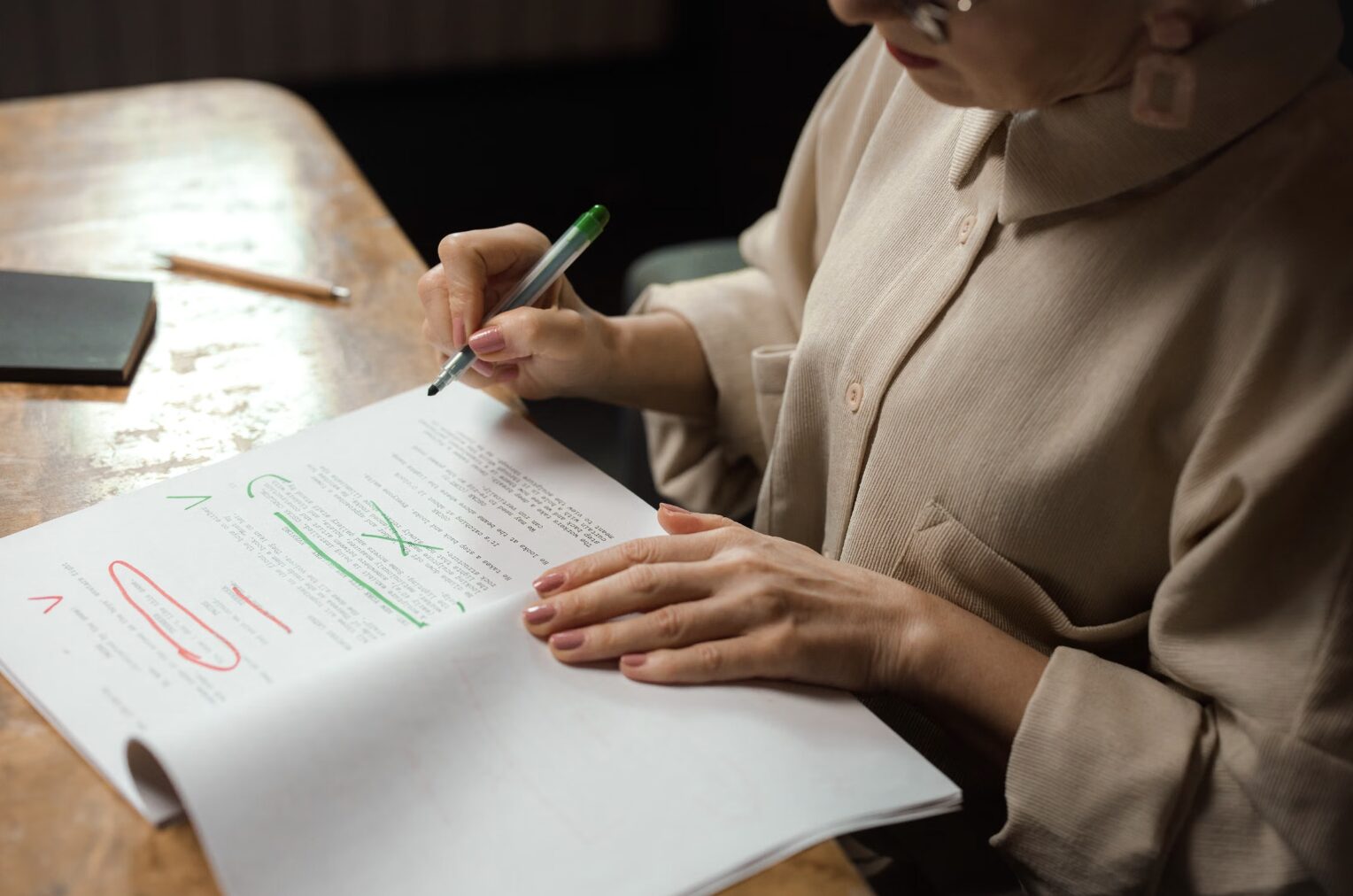
A proofreader mark is a standardized symbol an editor writes on a printed manuscript to show exactly what the author needs to change.
Proofreader marks, also called editors marks or proofreading marks, exist because you can't type a correction onto a piece of paper. The symbol does the job that a keystroke does on a screen: it tells you to delete this, move that, close up this gap, or set that word in italics.
They fall into two families, and knowing the difference saves you most of the confusion:
- Textual marks sit on or between the words themselves. They point at the exact spot where the change happens.
- Marginal marks sit in the left or right margin. They explain what the textual mark is asking for.
A single correction usually needs both. A caret in the line shows where; a circled abbreviation in the margin shows what. This is also why many editors ask for double-spaced, wide-margin printouts. They need room to work.
Proofreading marks cover four categories of problem: spelling, punctuation, grammar, and formatting. They do not cover structure, argument, or story. That's a different pass entirely, which is why it helps to know the different types of editing before you hire anyone.
A proofreading mark tells you what to change. It never tells you why. That conversation is still yours to have with your editor.
Editing marks are standardized, but not universal
The Chicago Manual of Style set the standard most US editors follow, and it's the system this guide uses. That said, individual editors adapt. Some use a shorthand they picked up in-house 20 years ago. Some skip the marginal mark entirely and write the instruction above the line.
Ask for a legend before the first round comes back. One email up front is cheaper than three rounds of guessing.
Do You Have to Use Proofreader Marks?
No. If you're editing a digital file, Track Changes and comments replace proofreader marks entirely. The symbols only matter when someone is working on paper.
For the vast majority of authors publishing today, the honest answer is that you will never draw one of these marks yourself. Your editor will send a Word document, you'll open it, and you'll accept or reject changes with a click.
Proofreader marks still show up in three situations, and they're worth knowing for exactly those:
- Printed proofs and galleys. The final read before print is often done on paper, because errors that hide on a screen jump out on a page.
- Editors who work by hand. Some of the best line editors still print, mark, and scan. It slows them down on purpose, and it catches more.
- Traditional and hybrid publishing workflows. If you're weighing self-publishing vs traditional publishing, know that traditional houses are far more likely to send you a marked-up physical proof.
Editing marks vs. Track Changes: which should you use?
Here's the practical comparison, since this is the decision most authors are actually making:
| Factor | Proofreader marks (paper) | Track Changes (digital) |
|---|---|---|
| Speed | Slower to mark, slower to apply | Fast, one click per change |
| Error catching | Higher. A different medium breaks reading autopilot | Lower on the same screen you drafted on |
| Ambiguity | Higher. Handwriting and non-standard symbols | Very low. The change is literally shown |
| Version control | Manual. You retype every fix | Built in. Full revision history |
| Best for | Final proofs, print layout, typography checks | Every earlier round of editing |
The most effective setup we see: run every editing round digitally, then do one final printed proofread before the book goes to print. You get the speed of Track Changes and the error-catching of paper.
Examples of Proofreader Marks
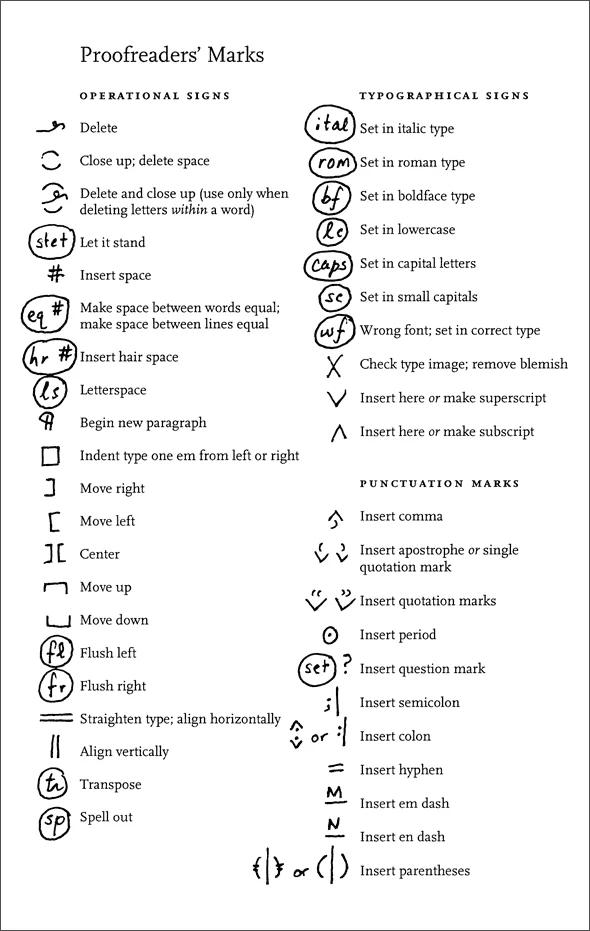
All 41 standard proofreading marks, grouped into 7 categories, with what each symbol means and its digital equivalent in Word or Google Docs.
The chart below comes from the Chicago Manual of Style and covers the main proofreading symbols used by editors in the US. Most editors mark in red ink so the corrections stand out against black type.
1. Deletion and retention marks (4)
| Mark | Symbol | What it means | Digital equivalent |
|---|---|---|---|
| Delete | line + swoop | Remove the word, phrase, or sentence struck through. A single letter or punctuation mark gets circled with a swoop above it. | Select and press Delete with Track Changes on |
| Delete space | ⌒ ⌄ | Close an unnecessary gap. Two curved lines, one arcing up and one arcing down, meet in the space. | Backspace once |
| Delete and close up | swoop + arcs | Remove a letter from the middle of a word and pull the remaining letters together. | Delete the letter directly |
| Let it stand | stet | Ignore the previous mark. "Stet" circled in the margin, usually with dots under the restored text. | Reject change |
2. Spacing marks (4)
| Mark | Symbol | What it means | Digital equivalent |
|---|---|---|---|
| Insert space | # with ∧ | Add a space. The # goes in the margin, the caret in the line shows where. | Press spacebar |
| Equalize space | eq # | Spacing between words or across a line is uneven. Fix the formatting. | Fix justification or remove double spaces |
| Insert hair space | hr # | Add a very thin space, used when punctuation sits too tightly against a letter in certain fonts. Rare. | Insert a thin-space character |
| Letterspace | ls | Spacing between individual letters in a word is uneven. | Font > Advanced > Character spacing |
3. Paragraph and indentation marks (2)
| Mark | Symbol | What it means | Digital equivalent |
|---|---|---|---|
| Begin new paragraph | ¶ | Break here. The pilcrow looks like a backwards capital P with two vertical strokes. | Press Enter |
| Indent one em | □ | Indent the line by one em space, which equals the point size of your font. At 12 pt type, one em is 12 points wide. | Tab, or set a first-line indent |
4. Position and alignment marks (9)
| Mark | Symbol | What it means | Digital equivalent |
|---|---|---|---|
| Move right | ] | Shift the text to the right. | Increase indent |
| Move left | [ | Shift the text to the left. | Decrease indent |
| Center | ] [ | Center this line, usually a chapter title or heading. | Ctrl/Cmd + E |
| Move up | ⎴ | Raise this text or block on the page. | Adjust spacing before the paragraph |
| Move down | ⎵ | Lower this text or block on the page. | Adjust spacing after the paragraph |
| Flush left | fl | Align the text hard to the left margin. | Ctrl/Cmd + L |
| Flush right | fr | Align the text hard to the right margin. | Ctrl/Cmd + R |
| Straighten type | = | Lines of type aren't horizontally level. You'll only see this on typewritten or hand-set copy. | Not applicable |
| Align vertically | ‖ | Line up the left or right edges of stacked text, such as a list or table column. | Set a tab stop or use a table |
5. Type style and case marks (8)
| Mark | Symbol | What it means | Digital equivalent |
|---|---|---|---|
| Set in italic | ital | Italicize the underlined text. Underline in the line, "ital" circled in the margin. | Ctrl/Cmd + I |
| Set in roman | rom | Remove italics and return the text to regular type. | Ctrl/Cmd + I to toggle off |
| Set in bold | bf | Bold the underlined text. | Ctrl/Cmd + B |
| Set in lowercase | lc | Change the marked letters to lowercase. | Shift + F3 to cycle case |
| Set in capitals | caps | Change the marked letters to uppercase. | Shift + F3 to cycle case |
| Set in small capitals | sc | Use small caps, which are uppercase letterforms reduced to roughly lowercase height. | Font > Small caps |
| Wrong font | wf | The typeface changed somewhere it shouldn't have. Match it back to the body font. | Clear formatting, reapply the style |
| Check type image | X | A character printed unclearly or left a blemish. Another mark you'll only meet on hand-set or typewritten pages. | Not applicable |
6. Word-level correction marks (2)
| Mark | Symbol | What it means | Digital equivalent |
|---|---|---|---|
| Transpose | tr | Swap the order of the marked letters or words. A squiggly line in the text loops around what moves. "The team does building trust activities" becomes "the team does trust building activities." | Cut and paste, or retype |
| Spell out | sp | Write the abbreviation, acronym, or numeral out in full. | Retype in full |
7. Punctuation insertion marks (12)
These all use a caret to show placement. A ∧ below the line handles marks that sit on the baseline; a ∨ above the line handles marks that sit high, such as apostrophes and quotation marks.
| Mark | Symbol | What it means | Digital equivalent |
|---|---|---|---|
| Insert here | ∧ or ∨ | Add whatever is written in the margin or above the line at this exact point. | Type it in |
| Insert comma | ∧ , | A comma is missing here. | Type a comma |
| Insert apostrophe | ∨ ’ | An apostrophe is missing, usually in a contraction or possessive. | Type an apostrophe |
| Insert quotation marks | ∨ “ ” | Open or close a quotation. Common in dialogue. | Type the quotation marks |
| Insert period | ⊙ | A period is missing. Shown as a dot inside a circle so it isn't lost on the page. | Type a period |
| Insert question mark | ? | A question mark is missing. Dropped straight into the line. | Type a question mark |
| Insert semicolon | ;⏐ | A semicolon is missing. Placed in the line rather than the margin. | Type a semicolon |
| Insert colon | :⏐ | A colon is missing. Also placed directly in the line. | Type a colon |
| Insert hyphen | -⁄- or = | Hyphenate these two words. Shown as a single or double short line. | Type a hyphen |
| Insert em dash | underlined M | Add an em dash, the long dash used to set off a phrase for emphasis without a colon or semicolon. | Ctrl + Alt + minus (Word) |
| Insert en dash | underlined N | Add an en dash, shorter than an em dash and longer than a hyphen. Used between dates and number ranges. | Ctrl + minus (Word) |
| Insert parentheses | (⏐) | Add parentheses around the marked text. A caret shows where each one goes. | Type the parentheses |
The 3 mistakes we see most often
- Applying marks without reading the whole page first. Marks interact. A transpose and a delete on the same line can contradict each other if you take them one at a time.
- Assuming a circled abbreviation is an instruction to type it. Circled text in the margin is always an instruction, never copy. Circled text in the line is usually a deletion.
- Retyping instead of correcting. Retyping a marked passage from scratch introduces new errors that nobody proofread. Fix only what's marked.
Edit Your Manuscript Masterfully
Knowing proofreading marks makes you a faster collaborator, but proofreading is the last of several editing passes, not a substitute for them.
You can now read any marked-up proof that lands on your desk, which puts you ahead of most first-time authors. Two things are worth knowing before you get there.
First, not every editor uses identical symbols. Ask yours for their legend before round one. Second, proofreading is the final pass, not the whole job. A proofreader catches a missing comma. They will not tell you that chapter 4 belongs after chapter 7, or that your opening buries the hook.
That's what the earlier passes are for. Copy editing handles clarity, consistency, and sentence-level craft. Developmental editing handles structure. If you want to reduce how much any of them cost, tighten the draft yourself first: check your writing conventions, cut weak verbs using a strong verbs list, and run the file through a tool like Grammarly or one of the AI book editing tools before a human ever sees it.
Cleaner draft in, cheaper edit out. Every hour you spend self-editing is an hour your editor spends on the work only they can do.
Are you ready to start working with professional editors? At selfpublishing.com, we offer 5 rounds of professional editing as well as book cover design, marketing support, and more. Reach out for a free consultation to make your dream book a reality today.
Frequently Asked Questions
What is a proofreader's mark called?
A proofreader's mark is called a proofreading mark, an editing mark, or an editor's mark. Marks written on or between the words are textual marks. Marks written in the margin are marginal marks.
What is a proofing mark?
A proofing mark is another name for a proofreading mark. It's a standardized symbol used on a printed proof to show a spelling, punctuation, grammar, or formatting correction the author needs to make.
Where can I find a proofreading marks chart?
The chart in the "Examples of Proofreader Marks" section above lists all 41 standard marks. It follows the Chicago Manual of Style, which is the system most US editors use. Save or print it as a one-page reference.
Are proofreading marks still used?
Yes, but less than they used to be. Most editing now happens in Word or Google Docs with Track Changes. Proofreading marks are still standard on printed proofs, galleys, and final press checks, where errors are easier to catch on paper.
How do I add proofreading marks in Word?
Turn on Track Changes under the Review tab. Every edit you make is recorded and shown to the author, who can accept or reject each one. Use the Comments feature for notes that aren't direct corrections.
How do you proofread a document?
Read it in a different format from the one you wrote it in, such as printed or on a different device. Check spelling, punctuation, grammar, and formatting in separate passes rather than all at once. Mark corrections with Track Changes or proofreading marks. Read it more than once. Errors hide in familiar text.
What's the difference between proofreading marks and editing marks?
Nothing. The terms are used interchangeably, along with "editors marks" and "proofreading symbols." All refer to the same set of standardized correction symbols.


