















TL;DR: The best book writing software for most authors is Scrivener (for complex long-form projects with organization needs), Google Docs (for collaboration and simplicity), or Atticus (for combined writing and formatting). For editing, ProWritingAid beats Grammarly for long-form manuscripts. For distraction-free writing, Ulysses (Mac) or FocusWriter (all platforms) are the top choices. The right tool depends on your genre, workflow, and whether you need writing, editing, or formatting support—or all three.
Why Your Writing Software Choice Actually Matters
Most writers assume any word processor will do. It won't.
The right writing software reduces friction between your ideas and the page. The wrong one creates it through disorganization, distraction, or technical limitations that slow you down when momentum matters most.
A novelist managing 15 chapters, 8 POV characters, and three timelines needs something fundamentally different from a nonfiction author writing a linear business book. Someone writing on a MacBook in a coffee shop needs different tools than someone writing collaboratively with a co-author in two different countries.
This guide covers 22 tools across four categories—drafting, editing, formatting, and distraction-free writing—so you can find exactly the right fit for how you actually write. We'll also tell you which combinations work best together, so you're not paying for tools that overlap.
Already know what kind of book you're writing but need help with the process itself? Read our complete guide on how to write a book before you pick your tools.
How to Choose Book Writing Software: 4 Questions First
Choose your book writing software by first identifying your primary need: drafting organization, prose editing, distraction-free focus, or publication formatting, then match the tool to that need.
Answer these four questions before reading any further:
- What are you writing? Fiction with complex structure (use Scrivener or Dabble), nonfiction with a linear argument (use Word, Google Docs, or Atticus), or a formatted final product (use Vellum or Atticus)?
- What's your biggest friction point? Getting distracted (use FocusWriter, Ulysses, or WriteRoom), staying organized (use Scrivener, yWriter, or LivingWriter), or writing with errors (use ProWritingAid or Grammarly)?
- What platform are you on? Mac users have more options (Scrivener, Vellum, Ulysses, Storyist). PC users should look at Scrivener for Windows, Atticus, Dabble, or Google Docs.
- Do you need to collaborate? Google Docs is the clear choice for real-time co-authoring. Most other tools are single-user.
Once you've answered those four questions, find your match in the sections below.
Category 1: Drafting & Organization Software
These tools are built for the writing itself—organizing chapters, scenes, and notes while you draft. This is where most of your time will be spent.
1. Scrivener – Best Overall for Long-Form Writing

Scrivener is the most comprehensive writing and project management tool available for long-form authors, offering a binder, corkboard, outliner, and research integration in a single workspace.
Platform: Mac, Windows, iOS Price: ~$49 one-time purchase (free trial available) Best for: Fiction writers, academics, nonfiction authors managing complex projects
Scrivener remains the gold standard for a reason. Its binder system lets you organize your manuscript into chapters and scenes that you can drag, rearrange, and view in any order. The corkboard gives you a bird's-eye view of your structure. The outliner tracks metadata—word counts, status, labels—across the entire project. Research notes, PDFs, images, and web pages live inside the project alongside your writing.
The tradeoff is the learning curve. Scrivener takes time to master. But for authors writing books with structural complexity (multiple POVs, nonlinear timelines, extensive research) no other tool comes close to its organizational depth.
Key features:
- Binder, corkboard, and outliner for manuscript architecture
- Distraction-free full-screen mode
- Research integration (PDFs, images, web clips)
- Compile tool for export to Word, PDF, EPUB, and more
- Split-screen mode for writing and referencing simultaneously
Not ideal for: First-time authors who need to start writing immediately without a learning curve, or writers who don't need structural organization.
2. Microsoft Word – Best for Traditional Publishing Submissions
Microsoft Word is the industry standard for manuscript submission to literary agents and traditional publishers. If you're pursuing the traditional route, you'll need to submit in Word format.
Platform: Mac, Windows (Microsoft 365 subscription or one-time purchase) Price: Microsoft 365 from ~$70/year; standalone purchase available Best for: Authors submitting to agents, collaborative editing with editors
Word is not the most exciting writing tool, but it's the most universally compatible. Track Changes is the standard way professional editors mark up manuscripts. Most literary agents request submissions in .docx format. And its formatting capabilities are unmatched for producing standard manuscript format.
For writers working with a traditional editor or co-author who needs to mark up your draft, Word is non-negotiable. For solo writing, most authors find it less inspiring than purpose-built tools.
Key features:
- Track Changes for editor collaboration
- Advanced formatting and styles
- Real-time collaboration via OneDrive
- Compatibility with every publishing platform
Not ideal for: Writers who need structural organization beyond a linear document.
3. Google Docs – Best Free Option for Collaboration
Google Docs is the best free writing tool for authors who collaborate with co-authors, editors, or writing coaches. Real-time multi-user editing makes it uniquely suited for shared projects.
Platform: Browser-based (all platforms), Android, iOS Price: Free Best for: Collaborative writing, early-stage drafts, writers on any device
Google Docs solves the collaboration problem that trips up most writing software: multiple people can edit, comment, and track changes simultaneously, with no version conflicts. Everything auto-saves to the cloud. You can access your manuscript from any device without transferring files.
For solo writers working on a linear nonfiction book, Google Docs is a perfectly capable drafting tool, especially if cost matters. Its limitations appear when managing complex fiction: there's no built-in way to organize scenes, switch between POVs, or view your chapter structure visually.
Key features:
- Real-time multi-user collaboration
- Auto-save and cloud access from any device
- Comment and suggestion mode for editorial review
- Free for individuals
Not ideal for: Fiction authors managing complex narrative structure, or writers who need offline-first reliability.
4. Ulysses – Best Distraction-Free Writing for Mac/iOS

Ulysses is the most polished distraction-free writing environment for Mac and iOS users, combining Markdown-based simplicity with a powerful document library and clean export options.
Platform: Mac, iPhone, iPad only Price: Subscription (~$6/month or ~$50/year; free trial available) Best for: Mac-only writers who value a clean, minimal workspace with cloud sync
Ulysses strips away everything that isn't writing. There are no visible toolbars, no distracting menus. Your entire library of documents—books, notes, drafts—lives in one organized sidebar. Markdown formatting keeps your prose clean without visible formatting codes. Export to EPUB, DOCX, or PDF is built in.
If you write exclusively on Apple devices and prioritize aesthetic simplicity over organizational depth, Ulysses is the tool for you. The subscription model is the main objection. If you prefer one-time purchases, look at Scrivener instead.
Key features:
- Markdown-based writing with live preview
- Unified library for all writing projects
- iCloud sync across Mac, iPhone, and iPad
- Clean export to EPUB, DOCX, PDF
Not ideal for: Windows or Android users; authors who need complex project management.
5. Atticus — Best All-in-One for Windows Authors
Atticus combines writing, organizing, and book formatting in a single cross-platform tool, making it the best Vellum alternative for Windows users who want professional output without multiple subscriptions.
Platform: Mac, Windows, Chromebook (browser-based) Price: ~$147 one-time purchase Best for: Self-publishing authors who want writing and formatting in one tool on any platform
Atticus is the most significant addition to this category in recent years. It bridges the gap between writing software (like Scrivener) and formatting software (like Vellum). You can write, organize, and format your final ebook and print files all in one place.
For Windows users who've felt excluded from Vellum's Mac-only ecosystem, Atticus is the direct answer. The writing environment is clean and chapter-based. The formatting output, for both ebook and print, is professional. The one-time purchase removes the subscription friction.
Key features:
- Writing and chapter organization built in
- Professional ebook and print formatting with multiple themes
- Exports to EPUB, MOBI, and print-ready PDF
- Cross-platform (works on Windows, Mac, and Chromebook)
Not ideal for: Authors who need deep structural organization comparable to Scrivener's binder and corkboard system.
6. Dabble – Best Cloud-Based Novel Plotter
Dabble is a cloud-based novel writing tool with a built-in plot grid and drag-and-drop scene organization. It's ideal for fiction writers who want Scrivener-like structure with a simpler, browser-based interface.
Platform: Browser-based (all platforms), Mac, Windows Price: Subscription (~$10/month; free trial available) Best for: Novelists who want scene and chapter organization without Scrivener's learning curve
Dabble sits between Google Docs (too simple) and Scrivener (too complex) for most fiction writers. Its plot grid gives you a visual overview of your novel's structure. Drag-and-drop scene organization makes restructuring painless. Progress tracking and writing goals help you build a consistent daily habit.
The subscription model is its main disadvantage. If you're writing one book and don't want an ongoing cost, Scrivener's one-time purchase is more economical long-term.
Key features:
- Plot grid for visual story structure
- Drag-and-drop scene and chapter organization
- Goal tracking and progress reports
- Cloud-based with auto-save
Not ideal for: Authors who prefer a one-time purchase or need offline-first tools.
7. yWriter – Best Free Scene-Based Organization Tool
yWriter is a free, open-source writing tool that organizes novels by scene, giving fiction authors structural control without any cost.
Platform: Windows (primary); basic Mac/Linux versions available Price: Free (donation optional) Best for: Fiction authors on a tight budget who need scene-level organization
yWriter lets you build your novel scene by scene, tracking characters, settings, and plot elements within each scene card. It's not pretty, but it's functional and completely free. For authors who want Scrivener-style organization without the price, yWriter is the closest free equivalent.
Key features:
- Scene and chapter organization with metadata tracking
- Character, location, and item databases
- Word count goals per scene and chapter
- Free with no subscription
Not ideal for: Authors who prioritize a modern, polished interface or need Mac-first support.
8. LivingWriter – Best Modern Cloud Drafting Tool

LivingWriter is a modern, cloud-based writing platform with genre-specific templates and automatic story element tracking, suited for novelists who want a contemporary alternative to Scrivener.
Platform: Browser-based (all platforms) Price: Subscription (~$8/month; free trial available) Best for: Fiction authors who want structured templates and cloud access
LivingWriter's genre-specific templates give fiction writers a head start on structure, romance, thriller, fantasy, and other genres each have their own pre-built frameworks. Its story element tracker links characters, locations, and items to the scenes they appear in, making continuity management easier than in most tools.
Key features:
- Genre-specific story templates
- Automatic story element tracking (characters, locations, items)
- Cloud-based with auto-save
- Clean, modern interface
Not ideal for: Nonfiction authors; writers who prefer a one-time purchase.
9. Novlr – Best for Progress Tracking
Novlr is a clean cloud-based writing tool specifically designed for novelists who want to track writing habits and progress alongside their drafting.
Platform: Browser-based (all platforms) Price: Subscription (~$10/month; free trial available) Best for: Habit-focused writers who want progress analytics integrated with their drafting tool
Novlr's differentiation is its analytics: it tracks your writing speed, daily word counts, and progress toward your goal, all without leaving the writing environment. For authors who respond well to data and streaks, this built-in accountability can be more effective than external habit trackers.
Key features:
- Progress and writing habit analytics
- Distraction-free writing environment
- Cloud-based with cross-device access
- Goal setting and tracking
Not ideal for: Authors who need complex scene or chapter organization.
10. Storyist – Best for Visual Storytellers (Mac)
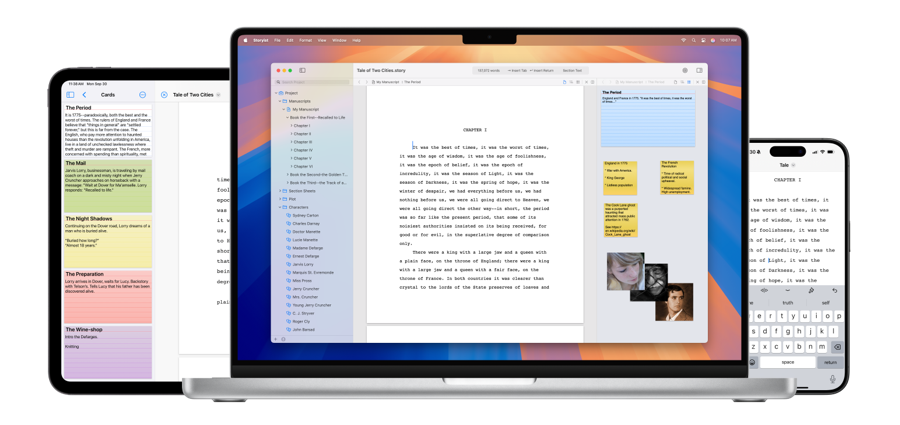
Storyist combines word processing with visual storyboarding and is ideal for authors and screenwriters who think visually and plan narratives through images and cards as much as text.
Platform: Mac, iOS only Price: One-time purchase (~$59); free trial available Best for: Mac-based novelists and screenwriters who want visual story development tools
Storyist's storyboard view lets you plan your narrative visually, attaching images to scenes, laying out character arcs as cards, and building a visual roadmap of your story. Combined with a full-featured word processor and outline view, it bridges visual brainstorming and manuscript writing in a way that few other tools attempt.
Key features:
- Visual storyboard alongside traditional text editing
- Character and plot development templates
- Outline view for structure management
- iOS companion app
Not ideal for: Windows users; writers who don't benefit from visual planning tools.
11. Manuskript – Best Free Open-Source Planning Tool
Manuskript is a free, open-source writing tool that supports the Snowflake Method of outlining—ideal for authors who want structured planning support without paying for commercial software.
Platform: Mac, Windows, Linux Price: Free Best for: Writers who use structured outlining methods and need a free, cross-platform solution
Manuskript is the most feature-rich free planning tool available. Its built-in support for the Snowflake Method gives outline-first writers a structured framework. Character and plot databases keep all narrative elements organized in one place. For authors who want organizational depth without the Scrivener price, Manuskript is the strongest alternative.
Key features:
- Snowflake Method outlining support
- Character, plot, and world-building databases
- Cross-platform (Mac, Windows, Linux)
- Completely free and open-source
Not ideal for: Writers who need a polished, modern interface or reliable mobile access.
12. Bibisco – Best for Character-Driven Fiction Planning
Bibisco is novel planning software that specializes in deep character development and narrative architecture. It's best for authors who develop characters before they develop plot.
Platform: Mac, Windows, Linux Price: Free (community edition); paid version unlocks advanced features Best for: Character-driven fiction authors who want guided narrative planning tools
Bibisco walks you through character interviews, backstory mapping, and relationship dynamics before you write a single scene. If your character bio template work is the most important part of your process, Bibisco gives you software-level support for it. The community edition is free; the paid version adds advanced export and organizational features.
Key features:
- Guided character interview and development tools
- Plot architecture frameworks
- Cross-platform (Mac, Windows, Linux)
- Free community edition available
Not ideal for: Authors who prefer to discover characters as they write; nonfiction writers.
13. Quoll Writer – Best Free Project Management Tool
Quoll Writer is a free writing tool that combines a distraction-free writing environment with detailed project management—tracking characters, scenes, and settings alongside your manuscript.
Platform: Mac, Windows, Linux Price: Free (donations welcome) Best for: Authors who want free, locally installed software with strong organizational features
Quoll Writer occupies useful territory: more organizational depth than a plain word processor, less complexity than Scrivener, and completely free. Its writing statistics and goal tracking help maintain momentum. Character and setting databases keep narrative elements organized without requiring a separate tool.
Key features:
- Character, scene, and setting management
- Writing statistics and goal tracking
- Full-screen distraction-free mode
- Free and locally installed
Not ideal for: Writers who need cloud sync or modern UI design.
14. WriteWay – Best Visual Manuscript Mapper

WriteWay is a visual manuscript organization tool that uses drag-and-drop chapter and scene mapping. It's suited for authors who think spatially about their book's structure.
Platform: Windows only Price: One-time purchase Best for: Windows-based authors who want a visual overview of their manuscript structure
WriteWay's visual mapping interface gives you a graphical representation of your manuscript, chapters and scenes arranged in cards you can drag and rearrange. For authors who find linear document views limiting, being able to see the whole structure at once makes restructuring decisions faster and more intuitive.
Key features:
- Visual drag-and-drop manuscript mapping
- Chapter and scene organization
- Writing environment integrated with visual overview
Not ideal for: Mac users; writers who need cloud access or modern design.
Category 2: Editing & Proofreading Software
These tools don't replace a professional editor, but they catch what your eye misses and help you develop better prose habits. For more on the editing process itself, read our guide on developmental editing and line editing.
15. ProWritingAid – Best Editing Tool for Long-Form Authors

ProWritingAid is the most comprehensive editing tool for long-form manuscripts, offering in-depth style reports, readability analysis, pacing checks, and grammar correction in a single platform.
Platform: Mac, Windows, browser extension, Word plugin Price: Subscription or one-time lifetime license (~$399); free version available with limitations Best for: Authors serious about improving prose quality before sending to a professional editor
ProWritingAid goes far beyond grammar. Its 20+ writing reports analyze pacing, dialogue balance, overused words, readability scores, and sentence length variation—all critical factors in long-form prose quality. The "sticky sentences" and "echoes" reports alone are worth the price for any author preparing a manuscript for submission or publication.
Key features:
- 20+ in-depth writing reports (pacing, style, readability, grammar)
- Integrates with Scrivener, Word, Google Docs, and browser
- Genre-specific writing goals
- Lifetime license option eliminates ongoing subscription costs
Best used as: A final pass after your own editing, before sending to a beta reader or professional editor.
16. Grammarly – Best Real-Time Grammar Assistant
Grammarly is the best real-time grammar and spelling checker for authors who want instant feedback while writing. It's available across every platform and writing environment.
Platform: Browser extension, Mac, Windows, iOS, Android Price: Free (basic); Premium ~$12/month Best for: Authors who want lightweight, always-on grammar and spelling support
Grammarly's strength is ubiquity and immediacy. It checks your writing everywhere—in Google Docs, in your browser, in email—and flags errors in real time without requiring you to run a separate analysis. The free version handles the most common errors well. The premium version adds tone detection, clarity suggestions, and more advanced style recommendations.
For long-form manuscript analysis, ProWritingAid provides more depth. For everyday writing quality across all your platforms, Grammarly's integration and accessibility are unmatched.
Key features:
- Real-time grammar, spelling, and punctuation correction
- Browser extension and app for any writing environment
- Tone and clarity suggestions (Premium)
- Cross-platform availability
Best used as: An always-on first-pass checker, with ProWritingAid for deeper manuscript analysis.
17. Hemingway Editor – Best for Clarity and Readability
Hemingway Editor analyzes prose for complexity and flags passive voice, excessive adverbs, and hard-to-read sentences. It's the fastest way to diagnose readability problems in a manuscript.
Platform: Browser (free), Mac/Windows desktop ($19.99 one-time) Price: Free online; $19.99 for desktop Best for: Authors whose prose tends toward complexity who want a quick readability audit
Hemingway Editor's color-coded system makes readability problems immediately visible: red for very hard sentences, yellow for hard, blue for adverbs, green for passive voice, purple for simpler word alternatives. Paste your chapter in, and you can see within seconds where the prose is fighting the reader.
It's a diagnostic tool, not a writing environment. Use it during revision, not drafting.
Key features:
- Color-coded readability analysis
- Passive voice and adverb flagging
- Readability grade level score
- Free online version available
Best used as: A revision pass specifically targeting clarity, complementing ProWritingAid's deeper analysis.
Category 3: Book Formatting Software
Formatting software is separate from writing software. These tools take your finished manuscript and produce publication-ready files for Amazon KDP, IngramSpark, Apple Books, and other platforms. For a full breakdown, read our book formatting software guide.
18. Vellum – Best Formatting Software for Mac Authors
Vellum is the highest-quality book formatting tool available for Mac users, producing professionally typeset ebooks and print books with minimal effort and beautiful output.
Platform: Mac only Price: $199.99 (ebooks + print); $99.99 (ebooks only)—one-time purchase Best for: Mac-based self-publishing authors who want the most polished ebook and print output available
Vellum's output quality is the standard by which other formatting tools are judged. Import your Word or Scrivener file, choose a style, and Vellum handles the typesetting—drop caps, chapter headers, ornamental breaks, front and back matter—automatically. Preview your book across every device type in real time. Export to EPUB, MOBI, and print-ready PDF in one click.
The Mac-only limitation is real: Windows authors need to look at Atticus instead. But for Mac users, Vellum pays for itself within the first book in time saved.
Key features:
- Stunning pre-designed formatting styles
- Real-time preview across device types
- Exports to EPUB, MOBI, and print PDF
- Automatic front and back matter formatting
Best for: Formatting, not writing. Use Scrivener or Word to write; use Vellum to produce your final files.
Category 4: Distraction-Free Writing Apps
These minimalist tools remove every interface element except your words. They don't organize your manuscript or check your grammar, they just help you write without interruption.
19. FocusWriter – Best Free Distraction-Free App
FocusWriter is a free, fully customizable distraction-free writing environment available on all major platforms—the best no-cost option for writers who need to eliminate digital noise.
Platform: Mac, Windows, Linux Price: Free (donation optional) Best for: Writers on any platform who want a distraction-free environment without a subscription
FocusWriter hides everything—taskbar, notifications, toolbars—behind a full-screen writing interface you can customize with themes, backgrounds, and typewriter sounds. Daily writing goals and timers help build consistent writing habits. The interface disappears when you're writing and reappears when you move your cursor to the edge.
For writers who find standard software environments cognitively distracting, FocusWriter creates the conditions for sustained focus, for free.
Key features:
- Full-screen distraction-free mode
- Customizable themes, backgrounds, and typewriter sounds
- Daily word count goals and timers
- Free and cross-platform
20. WriteRoom – Best Minimalist Mac Writing App
WriteRoom pioneered the distraction-free writing concept: a green-text-on-black full-screen environment that removes every visual element except your words.
Platform: Mac only Price: $9.99 one-time purchase Best for: Mac users who want a classic, no-frills distraction-free writing environment
WriteRoom's aesthetic is intentionally retro: green or white text on a black background, full-screen, no interface. It's the original distraction-free writing app, and it does one thing extremely well. If Ulysses feels like too much and you just want a blank screen, WriteRoom delivers.
Key features:
- Full-screen distraction-free writing
- Customizable colors and fonts
- Minimal interface with no visible toolbars
- One-time purchase
21. iA Writer – Best Cross-Platform Minimalist Tool

iA Writer is a clean, Markdown-based writing tool with a distinctive focus mode that dims everything except the sentence you're currently writing—available on Mac, Windows, iOS, and Android.
Platform: Mac, Windows, iOS, Android Price: One-time purchase (varies by platform, ~$30–$50) Best for: Writers who want a polished, cross-platform distraction-free tool with Markdown support
iA Writer's "focus mode" dims all text except the current sentence or paragraph, a subtly powerful technique for staying present in the writing rather than re-reading or editing what you've already written. Its Markdown support keeps formatting simple. Cross-platform availability makes it the most versatile distraction-free tool in this list.
Key features:
- Focus mode (dims all text except current sentence)
- Markdown-based writing with preview
- Cross-platform (Mac, Windows, iOS, Android)
- Clean export to Word, PDF, and HTML
22. OmmWriter – Best Immersive Writing Environment
OmmWriter combines a distraction-free writing interface with ambient soundscapes and nature backgrounds to create a genuinely immersive writing session. Unusual but effective for certain writers.
Platform: Mac, Windows, iPad Price: Pay-what-you-want (suggested $5.11) Best for: Writers who find silence or standard environments cognitively uncomfortable and benefit from ambient sensory grounding
OmmWriter's differentiation is sensory: it plays gentle ambient music or nature sounds while you write, with background imagery ranging from snow to forests. For writers who find pure silence paralyzing or sterile coffee shop environments too distracting, OmmWriter creates a middle path, controlled ambient stimulus that signals "writing mode" without competing with thought.
Key features:
- Built-in ambient soundscapes
- Calming nature backgrounds
- Full-screen distraction-free mode
- Pay-what-you-want pricing
Quick Comparison: Which Tool Is Right for You?
| Your Situation | Best Tool |
| Complex fiction (Mac or Windows) | Scrivener |
| Complex fiction (Windows, want formatting too) | Atticus |
| Collaborative writing or free option | Google Docs |
| Mac minimalist writer | Ulysses |
| Traditional publishing submission | Microsoft Word |
| Novel plotting with visual grid | Dabble |
| Free scene-based organization | yWriter |
| Character-driven planning | Bibisco |
| Deep grammar + style editing | ProWritingAid |
| Real-time grammar across all apps | Grammarly |
| Quick readability audit | Hemingway Editor |
| Professional ebook + print formatting (Mac) | Vellum |
| Professional ebook + print formatting (Windows) | Atticus |
| Free distraction-free writing | FocusWriter |
| Minimalist writing (all platforms) | iA Writer |
| Ambient writing environment | OmmWriter |
The Best Software Combinations for Authors
Single-tool authors: Google Docs handles drafting, commenting, and basic formatting for free. It's the only tool many authors ever need, especially nonfiction authors with linear structures.
The serious fiction stack: Scrivener (drafting and organization) + ProWritingAid (editing) + Vellum (formatting for Mac) or Atticus (formatting for Windows).
The budget-conscious stack: yWriter or Manuskript (free organization) + Grammarly free tier (basic grammar) + free book templates for formatting.
The Mac-only premium stack: Scrivener + ProWritingAid + Vellum. This combination handles everything from first word to publication-ready file at the highest quality level available.
Common Mistakes When Choosing Book Writing Software
Choosing software before knowing your workflow. Don't pick Scrivener because everyone recommends it if you're writing a straightforward nonfiction book that would work perfectly in Google Docs. Match the tool to the actual complexity of your project.
Using your writing software for formatting. Microsoft Word produces poor ebook files. Google Docs produces worse ones. If you're self-publishing, use a dedicated formatting tool—Vellum, Atticus, or Reedsy—for your final output.
Treating editing software as a substitute for a real editor. ProWritingAid and Grammarly improve your manuscript. They cannot replace a professional book editor who understands structure, voice, and narrative.
Switching tools mid-draft. Learning new software takes time that should be spent writing. Choose your primary drafting tool before you start, and commit to it through your first draft. Switch tools between projects, not between chapters.
Over-investing in software before finishing a book. Expensive software does not produce books. Habits and systems do. If you haven't finished a book before, start with free tools—Google Docs, yWriter, FocusWriter—and invest in premium software once you've proven you'll use it.
Frequently Asked Questions
What is the best book writing software? For most authors, the best overall book writing software is Scrivener (complex fiction or nonfiction), Atticus (cross-platform writing and formatting combined), or Google Docs (free, collaborative). The best tool depends on your genre, platform, and whether you need writing, editing, or formatting support.
Is Scrivener worth it? Yes, for authors writing long, structurally complex books. Scrivener's binder, corkboard, and outliner are the most powerful organizational tools available for long-form writers. For shorter, linear nonfiction books, Google Docs or Microsoft Word may be sufficient and simpler.
What software do professional authors use? Professional authors use a wide range of tools. Many fiction authors use Scrivener for drafting. Many nonfiction authors use Word or Google Docs. Most serious self-publishers use Vellum (Mac) or Atticus (all platforms) for formatting. ProWritingAid is widely used for pre-submission editing.
What is the best free book writing software? The best free options are Google Docs (collaboration and simplicity), yWriter (scene-based fiction organization), FocusWriter (distraction-free writing), and Manuskript (structured planning with Snowflake Method support).
Do I need different software for writing and formatting? Usually yes. Most writing tools produce messy ebook files when exported directly. Dedicated formatting tools—Vellum, Atticus, or Reedsy—produce professional output. The exception is Atticus, which handles both writing and formatting reasonably well in one tool.
Can I write a book in Google Docs? Absolutely. Many authors write their entire book in Google Docs. It's free, collaborative, and works on any device. Its limitation is organizational. It doesn't have scene management or structural overview tools. For linear nonfiction, Google Docs is often all you need. For complex fiction, a more structured tool like Scrivener or Dabble will serve you better.
The Right Tool Won’t Write Your Book But the Right System Will
Software is infrastructure. It removes friction. It doesn't create the habit, the discipline, or the daily showing up that actually produces a finished manuscript.
The authors who finish their books aren't necessarily using better tools. They're using better systems—protected writing time, clear writing goals, accountability structures, and a process that gets words on the page consistently.
If you want help building that system, not just picking the right software, but actually finishing and publishing your book, the selfpublishing.com team works with authors at every stage of the process.
Schedule a free strategy call and let's figure out the right path for your book.
Or start with our complete guide on how to write a book. It covers the full process from idea to finished draft, with or without fancy software.
Last updated: April 2026