














TL;DR: Amazon KDP (Kindle Direct Publishing) is Amazon's free self-publishing platform for eBooks, paperbacks, and hardcovers. To publish, you format your manuscript, convert it with Kindle Create, enter your book details, upload your files and cover, set your rights and pricing, then hit publish. English-language eBooks go live in the Kindle Store within ~12 hours. eBook royalties are 35% or 70%; print royalties are 50% or 60%.
For the first time in history, authors can self-publish a book with the click of a button, and Kindle Direct Publishing has made the process more accessible Self-publishing on Amazon used to feel like a locked door. You had a finished manuscript and no idea how to turn it into a real, purchasable book...so it sat on your hard drive.
Amazon KDP removed that door entirely. For the first time in publishing history, any author can upload a book and have it for sale to millions of readers within hours—no agent, no gatekeeper, no upfront print run.
But "easy to access" isn't the same as "obvious." The dashboard has a dozen fields, the formatting rules are specific, and one wrong setting can stall your launch.
This guide walks you through the entire Amazon KDP process, from formatting your files to clicking publish, so by the end you'll have a book live in the Kindle Store and ready for readers.
What is Amazon KDP?
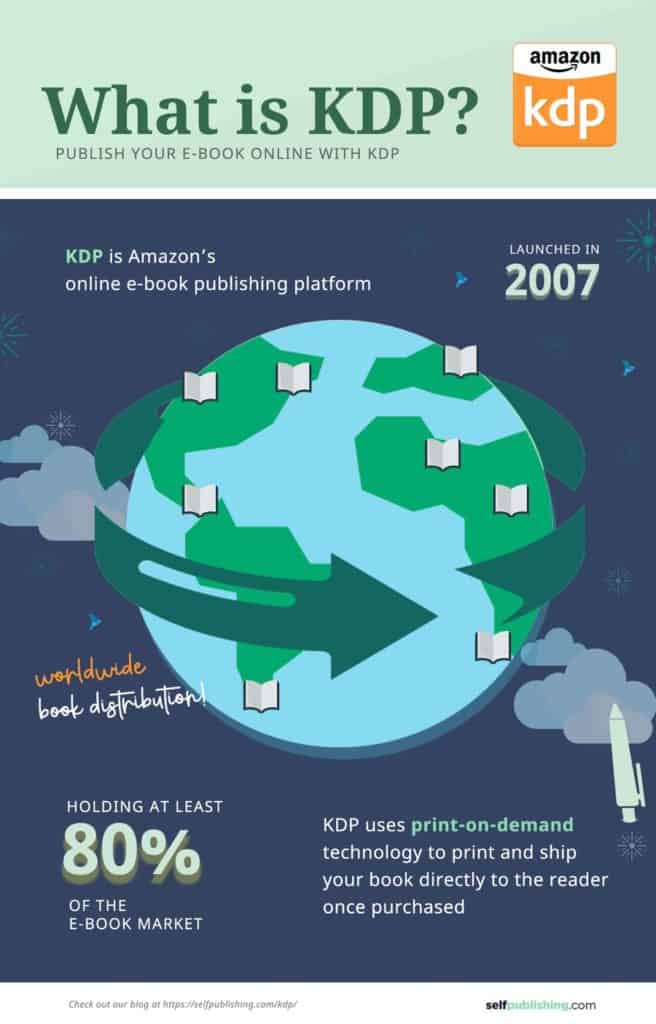
Amazon KDP (Kindle Direct Publishing) is Amazon's free platform for self-publishing eBooks, paperbacks, and hardcovers that readers buy as digital downloads or print-on-demand books.
Launched in 2007, KDP is the largest self-publishing platform in the world and one of the top self-publishing companies available to indie authors. Amazon controls roughly 67% of the U.S. eBook market—climbing to about 83% when Kindle Unlimited reads are included—and an estimated 68% of global eBook sales. More than 1.4 million self-published titles are released through KDP every year.
That dominance is why KDP reshaped the decision behind how to become an author. Writers now choose between two paths: traditional publishing or self-publishing. When weighing self-publishing vs. traditional publishing, most indie authors choose KDP for its higher royalty rates, speed to market, and the fact that there are no submission gatekeepers to clear.
How does Amazon KDP work?
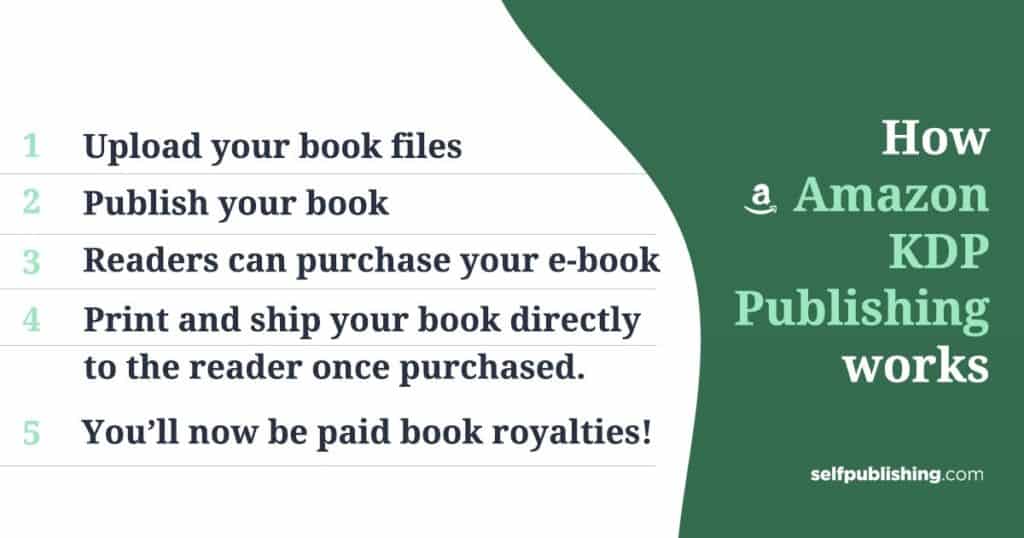
Amazon KDP lets authors upload book files that appear in the Kindle Store as eBooks for instant download or as print-on-demand paperbacks printed only when a reader buys one.
There's no inventory and no upfront printing cost. Here's the flow:
- Upload your files (manuscript + cover) to Amazon KDP
- Publish to the Kindle Direct Publishing platform
- Readers buy your eBook and download it instantly to any Kindle device or app
- Readers buy your paperback, and KDP prints and ships it on demand—print cost is deducted from your royalty
- Amazon pays you royalties monthly for every copy sold
Not sure which file type to use? Start with our guide on how to publish an eBook before you upload.
Benefits of publishing on Amazon KDP
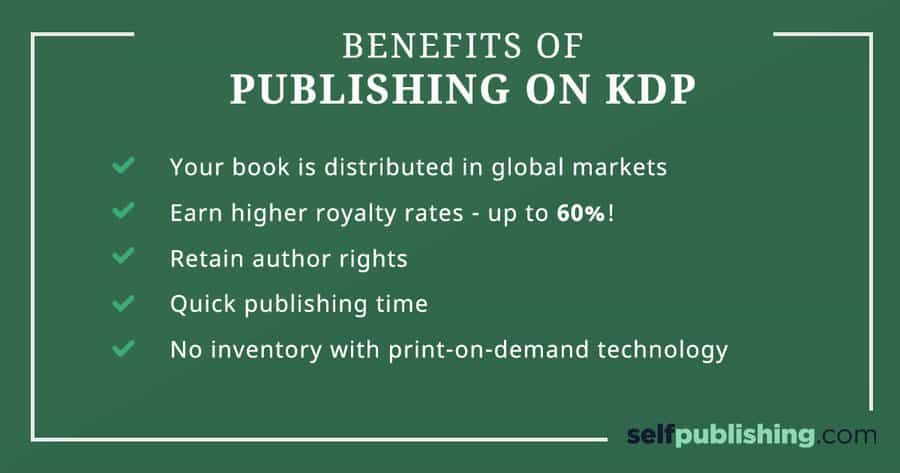
Amazon KDP gives authors global distribution, higher royalties than traditional publishing, retained rights, fast time-to-market, and zero inventory risk.
| Benefit | What it means for you |
|---|---|
| Wide distribution | Reach readers across the U.S., Europe, Japan, and 10+ marketplaces in 45+ languages. |
| Higher royalties | Earn up to 70% on eBooks and up to 60% on print—well above typical traditional royalties. |
| You keep your rights | KDP uses a non-exclusive agreement, so you retain ownership of your book. |
| Fast publishing | English eBooks go live in ~12 hours instead of the 12–18 months traditional publishing can take. |
| No inventory | Print-on-demand means books are printed as they sell—no garage full of unsold copies. |
Amazon KDP publishing cost & royalties
Publishing on Amazon KDP is free. Authors pay nothing to upload, but typically invest in editing, cover design, and formatting, and Amazon deducts print costs from paperback royalties.
How much does it cost to publish on Amazon KDP?
It costs $0 to publish on KDP. Amazon never charges you to upload or list a book.
Your real costs come from two places:
- Print costs (paperback/hardcover only)—deducted automatically from each print sale.
- Production and marketing—optional but recommended investments like editing, book cover design, formatting, and book marketing.
For a full breakdown of what indie authors actually spend, see our guide on the cost to publish a book.
How do Amazon KDP royalties work?
KDP pays you a percentage of your book's list price. The rate depends on format and price:
- eBooks: 35% or 70%, depending on price and distribution settings (unchanged)
- Paperbacks & hardcovers: 60% for books priced at or above ~$9.99 USD, and 50% for books priced below that threshold—a change Amazon rolled out on June 10, 2025. Thresholds vary by marketplace (e.g., $9.98 and below = 50% on Amazon.com; £7.98 and below in the UK)
Print royalties are calculated on list price minus printing cost. To model your exact earnings before you set a price, use our free Book Royalties Calculator.
How much are other books in your niche earning?
Amazon doesn't publish individual author earnings, but you can estimate competitor revenue using a book's Amazon Best Seller Rank (ABSR). Tools like Publisher Rocket, KDSPY, and K-lytics translate rank into projected sales so you can size up a niche before you commit.
When does Amazon KDP pay?
KDP pays royalties monthly, roughly 60 days after the end of the month they were earned. Once your balance clears the minimum payout threshold. You can be paid by direct deposit, wire transfer, or check.
Amazon KDP costs & royalties at a glance
| Item | Detail |
|---|---|
| Cost to publish | Free |
| Cost to print | Fixed cost + (page count × per-page cost) |
| eBook royalties | 35% or 70% |
| Paperback/hardcover royalties | 60% at/above ~$9.99 USD list price; 50% below (as of June 10, 2025) |
| Payout rule | Must meet minimum threshold |
| Payout schedule | Monthly, ~60 days after month-end |
What is KDP Select?
KDP Select is an optional program where you give Amazon exclusive rights to sell your eBook on Kindle in exchange for promotional tools, Kindle Unlimited royalties, and a chance at higher visibility.
Enrolling means your eBook can't be sold on any other platform (Apple Books, Kobo, etc.) for the enrollment period. In return, you get access to Kindle Unlimited page-read royalties, Kindle Countdown Deals, and Free Book Promotions.
Enrollment runs in 90-day terms that you can auto-renew or opt out of — so you can test exclusivity for one cycle and reassess. For many genre-fiction authors, Kindle Unlimited acts as a discovery engine; for nonfiction and wide-distribution authors, the exclusivity trade-off often isn't worth it.
Quick gut check before you format: The #1 reason first-time authors stall on KDP isn't the tech — it's not knowing whether their book is actually ready to publish. If you want a proven, step-by-step path from manuscript to launch (with 1:1 coaching), see how selfpublishing.com's Become a Bestseller program works.
How to format your book for Amazon KDP
To format for KDP, prepare your manuscript in Microsoft Word using Kindle-supported styles, add the required front and back matter, then convert the file with Kindle Create before uploading.
This guide uses Microsoft Word because most authors already own it and the learning curve is minimal. If you'd rather not do it yourself, you can use dedicated book formatting software or hire a professional—see our full book formatting steps for both paths.
Kindle formatting rules: what works and what doesn’t
Kindle has limited or no support for these elements, so avoid them:
- Text boxes
- Manual bullets and auto-numbering
- Special fonts
- Headers and footers
- Tables and special Word styles
These elements are supported:
- Indentations
- Bold and italics
- Headings (use Word's Heading 1 style for chapter titles)
Best practice: Upload a .kpf file created in Kindle Create rather than a raw Word file. Kindle Create optimizes fonts, spacing, and margins for Kindle devices.
Structure your book (front + back matter)
Every KDP book should include these five parts in order:
- Title page—centered title, author name below, page break after
- Copyright page—
Copyright © [Year] [Author Name]. All rights reserved - Table of contents—built with Word's automatic ToC tool (uncheck page numbers; Kindle uses hyperlinks)
- Body—your manuscript content, divided into chapters with a page break after each
- Back matter—acknowledgments, author bio, and promos for your other books
Cover image specs for KDP
- Minimum: 625 px (short side) × 1,000 px (long side)
- Recommended eBook cover: 2,560 × 1,600 px
- Recommended print cover: 2,813 × 4,500 px
- File format: TIFF or JPEG
Your cover is uploaded separately—don't embed it in your Word file. Because a professional cover is one of the biggest drivers of sales, consider hiring a designer rather than relying on Amazon's Cover Creator.
How to self-publish on Amazon KDP in 7 steps
Once your file is formatted, publishing on KDP takes seven steps: format, convert, gather assets, enter details, upload files, set rights and pricing, and publish.
Step 1: Format your manuscript
Finish formatting in Word using the Kindle-supported styles above, with all five structural parts in place.
Step 2: Convert your file with Kindle Create
Download Kindle Create (Windows or macOS), open your Word file, accept the suggested chapter titles, choose a theme, and preview your book on tablet, phone, and e-reader views. Then export a .kpf file ready to upload.
Step 3: Gather your publishing assets
Have everything in one text file so you can copy-paste during upload:
- Formatted Word or Kindle Create (.kpf) file
- Title and subtitle
- Cover image (2,813 × 4,500 px for print)
- Book description (≤4,000 characters)
- Your book's category and up to 7 keywords
- Bank/financial info for royalty payments
Step 4: Enter your book details
Log in to KDP, click Kindle eBook, and fill in language, title, subtitle, series info, author/contributor names, and your description. Add your 7 keywords (double-word phrases count as one), then set your categories. Use Publisher Rocket to find the categories and keywords readers actually search.
Step 5: Upload your files
Upload your .kpf (or Word) manuscript and your cover image, then launch the Previewer to confirm everything renders correctly. Fix any issues in your source file and re-upload if needed.
Step 6: Set rights and pricing
Choose Worldwide rights—all territories (don't leave markets on the table), set your list price, and decide on Kindle Matchbook, Book Lending, and whether to enroll in KDP Select. Use KDP's pricing tool to see what comparable books charge.
Step 7: Publish
Click Publish. Your dashboard status changes to "In Review," and your English-language eBook goes live in the Kindle Store within ~12 hours (about 48 hours for non-English titles). You'll get a confirmation email when it's live, then optimize your Amazon Author Central page.
How to order author copies on Amazon KDP
To order author copies, make sure your paperback is in "Live" status, go to your Bookshelf, click "Order Author Copies," choose your quantity and marketplace, and check out at printing cost.
Author copies are sold to you at print cost (no royalty), making them the cheapest way to get physical books for events, reviews, or your own shelf.
Once your book is live, shift into launch mode. A strong launch is what separates books that sell from books that disappear—start with our guide to a successful book launch and promotion sites like BookBub to reach new readers.
Common Amazon KDP mistakes to avoid
- Pricing print books below the threshold by accident—dropping under ~$9.99 USD cuts your royalty from 60% to 50%
- Skipping keyword and category research—guessing wastes 7 valuable keyword slots. Tools like Publisher Rocket fix this
- Using a DIY cover—covers are judged in seconds; a weak one kills conversions
- Uploading a raw Word file—convert to .kpf first for clean formatting
- Treating "publish" as the finish line—publishing is the start of marketing your book, not the end
Frequently asked questions about Amazon KDP
Is Amazon KDP free?
Yes. Amazon KDP is free to use—there's no cost to upload or publish. For print books, Amazon deducts the printing cost from your royalty on each sale.
How much does Amazon KDP pay authors?
KDP pays 35% or 70% royalties on eBooks and 50% or 60% on paperbacks and hardcovers, depending on list price. Print royalties are calculated on list price minus printing cost.
How long does it take for a KDP book to go live?
English-language eBooks typically go live in the Kindle Store within about 12 hours. Non-English books can take up to 48 hours.
Do I keep the rights to my book on Amazon KDP?
Yes. KDP uses a non-exclusive agreement, so you retain full ownership and rights to your book—even while it's listed for sale on Amazon.
What is the difference between KDP and KDP Select?
KDP is the standard publishing platform that lets you sell anywhere. KDP Select is an optional program that makes your eBook exclusive to Amazon for 90-day terms in exchange for Kindle Unlimited royalties and promotional tools.
Do I need an ISBN to publish on Amazon KDP?
No. Amazon assigns a free ISBN (or ASIN for eBooks). However, owning your own ISBN gives you more control—learn more in our guide on getting an ISBN for a self-published book.
Your next step as a self-published author
Publishing on Amazon KDP is genuinely accessible, but the authors who build real readerships don't do it alone or by guesswork. They follow a proven process for writing, publishing, and launching.
Since 2015, selfpublishing.com has helped a community of 250,000+ authors publish in 91+ countries, publishing an average of 3 books a day. If you want that same step-by-step path—with 1:1 coaching, cover design, formatting, and done-with-you KDP upload—explore Become a Bestseller, or see how we help authors market and scale inside the Author Advantage Accelerator.
Your book can change lives—including yours. The first step is hitting publish.