














TL;DR: bibisco is open-source novel writing software built around character development and story structure rather than formatting. The Community Edition is free forever but only includes 7 of its 27 features once your 30-day trial ends. The Supporters Edition costs $69 as a one-time payment. If you plan your novels before you draft them, it is one of the best values in writing software. If you want polish, mobile-first writing, or publish-ready formatting, look elsewhere.
There is a particular kind of writer who falls completely in love with bibisco, and a second kind who downloads it, pokes around for ten minutes, decides it looks like a piece of software from 2011, and never opens it again.
Both reactions are fair. That is what makes this one interesting to write about.
I have been through the whole thing (installed it, built a project in it, hit the wall where the free version stops, and read a few hundred user comments to see whether my experience matched everyone else's), so this bibisco review covers what it does, what it costs in 2026, where it genuinely beats the expensive options, and where it will quietly frustrate you.
Fair warning up front: the pricing and the feature split both changed recently, and most of the reviews you will find online are still quoting numbers from 2024.
Quick note on the name, because it trips people up. The developer styles it lowercase, always: bibisco, never Bibisco. I will follow his lead for the rest of this piece.
What is bibisco?
bibisco is desktop novel writing software built around structured story planning. It is open source, available for Windows, macOS, and Linux, and comes in a free Community Edition and a paid Supporters Edition.
bibisco is the work of one Italian developer, Andrea Feccomandi, who has been building it since roughly 2014 and is still building it today. That single fact explains most of what you will like and most of what you will not like about it.
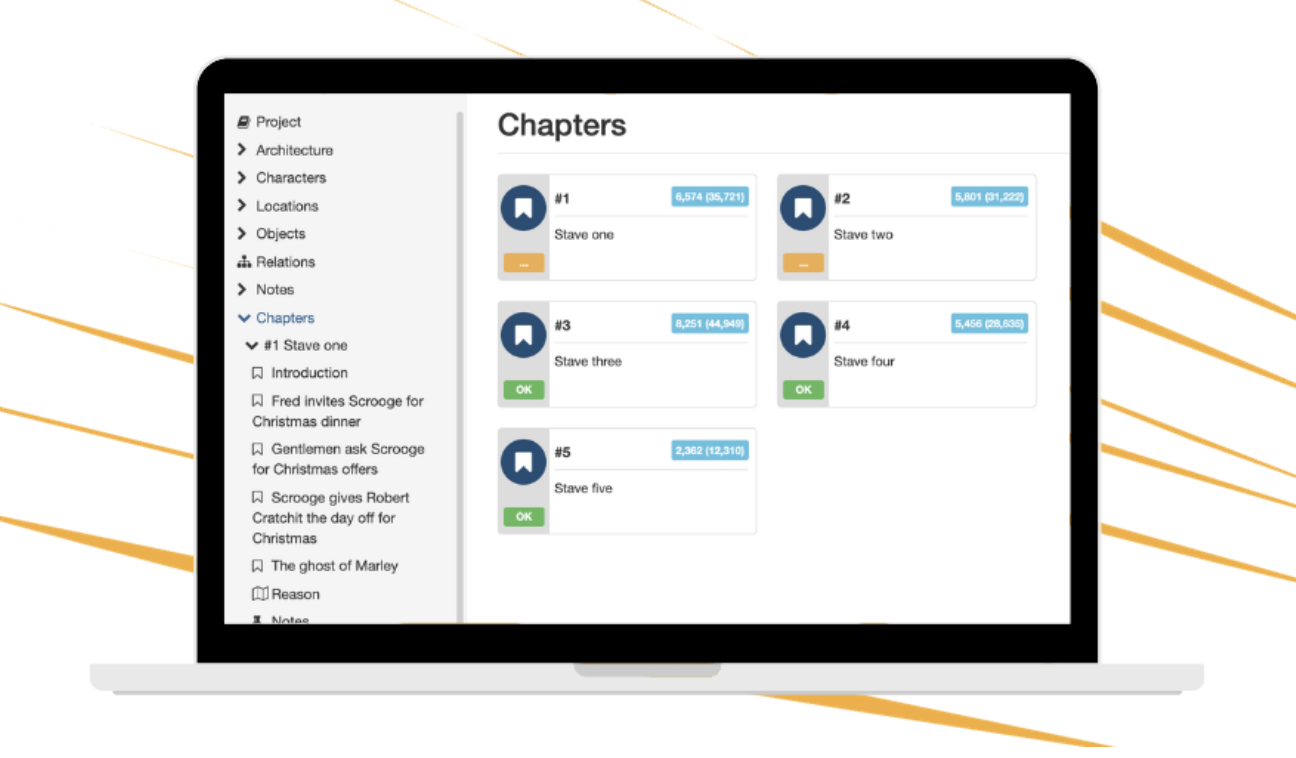
The philosophy is straightforward. Before you write a word of prose, bibisco wants you to know your premise, your fabula, your storylines, your locations, and, above all, your characters. The software walks you through all of it with structured prompts instead of handing you a blank page and wishing you luck. Then you write your chapters and scenes inside that scaffolding, and the software keeps showing you how the pieces relate to each other.
That is a real point of view about how novels get made, and it is the opposite of the point of view behind something like Scrivener, which is essentially a beautifully organized filing cabinet that trusts you to know what you are doing. bibisco is more opinionated. Some writers find that liberating and some find it bossy.
As of this writing the current version is 5.1.3, and bibisco says more than 200,000 writers have downloaded it. It is available in 15 languages, which is unusual for indie writing software and genuinely useful if English is not your first language.
Is bibisco open source? Yes, and it matters more than you’d think
bibisco is released under the GNU GPL license with its source code publicly available on GitHub, which means your projects stay on your own machine and the software cannot be taken away from you.
The phrase "bibisco open source" gets searched a lot, and there is a reason writers care.
Open source here means three practical things. First, the code lives publicly on GitHub, so anyone can inspect it, fork it, or contribute to it. The EPUB and TXT export features were actually written by a volunteer, for free, which is a nice illustration of how the project works.
Second, and this is the part that matters most day to day, your projects are stored locally on your computer in a folder you control. There is no account required for the desktop app, no cloud lock-in, and no scenario where a company gets acquired and your manuscript becomes hostage to a subscription you cannot afford. If you have ever watched a writing app shut down and taken people's work with it, you understand why this is worth something.
Third, bibisco cannot really die. Even if Andrea stopped working on it tomorrow, the code is out there for someone else to pick up.
The trade-off is the one you always get with a small open-source project. The interface has a homemade quality to it, tech support is one person's email inbox, and updates arrive when they arrive rather than on a roadmap.
bibisco features: what it actually does
bibisco's standout features are structured character interviews, a relations board, narrative strands, a timeline, and analysis tools that show point-of-view balance and character distribution across your chapters.
Here is where bibisco earns its reputation. These are the things that made me understand why its fans are so loyal.
Character interviews
This is the feature people rave about, and rightly so. Instead of giving you an empty character sheet, bibisco interviews you about your character, question by question, across physical traits, psychology, ideas and passions, sociology, and behaviors. You answer as the character, in first person.
It sounds gimmicky. It is not. Something happens when you have to answer "what do you regret most?" in your character's voice that does not happen when you stare at a field labeled "backstory." I got more usable material out of 20 minutes of this than I usually get out of an hour of free-writing a character sketch. In the paid edition you can add your own custom questions, which is how you end up with an interview template tailored to your genre.
The relations board
A visual map of how every character, location, and object connects to every other one. For a sprawling cast, or a mystery where who-knew-what-when is the entire plot, this is the kind of thing that saves you from a continuity disaster in chapter 30.
Narrative strands and the timeline
Strands let you tag scenes by plot thread, so you can see at a glance whether your subplot has gone missing for 14 chapters. The timeline lays events out chronologically, which is a lifesaver if your story jumps around in time and you need to know what actually happened when, as opposed to when the reader learns about it.
Analysis
bibisco will show you chapter lengths, point-of-view distribution, character frequency, and where your locations appear. It is a structural x-ray of your draft. If you suspect your second protagonist disappears for most of act two, this tells you in about four seconds instead of after a beta reader points it out.
The writing side
The editor itself is clean and perfectly pleasant, with a distraction-free mode, dark theme, word count goals, and a "novel reading mode" that lets you read your book straight through the way a reader would. Exports cover PDF, DOCX, TXT, EPUB, and an archive format for backups. Automatic backups run in the background, which is the sort of unglamorous feature you only appreciate once.
What it does not do, and this is worth saying plainly, is formatting. bibisco is not going to produce a print-ready interior file for you. That is a different job and you will need a different tool for it. Our best book writing software guide breaks down which tools handle which stage of the process, because almost nobody gets through a whole book on one app.
bibisco price in 2026
bibisco Community Edition is free forever. The Supporters Edition is a one-time payment of $69, up from $47 in 2024. bibisco Everywhere, the mobile and sync add-on, is a separate subscription at $3.49 per month or $29.99 per year.
Let's talk money, because the bibisco price has changed and a lot of older reviews are still repeating the old figure.
bibisco free Community Version
Free, forever, no account, no card, no nagging. It runs on Linux, macOS, and Windows, and when you install it you get a 30-day trial of every Supporters Edition feature so you can see the whole thing before deciding.
Here is the catch, and it is a significant one. When those 30 days end, the bibisco free Community Version drops down to 7 features out of 27:
- Unlimited projects
- Premise, fabula, setting, and storylines
- Character interviews
- Locations
- Chapters and scenes
- Export to PDF, DOCX, TXT, and archive
- Automatic backups
That is a real writing tool, and for a lot of people it is genuinely enough to draft a novel. But look at what walks out the door on day 31: analysis, mind maps, timeline, novel outline, groups, unlimited notes, objects, profile pictures, custom interview questions, prologue and epilogue support, moving scenes between chapters, dark theme, search and find/replace, distraction-free mode, writing goals, EPUB export, and extra fonts.
Find and replace. Dark mode. Writing goals. Those are not premium features in most people's mental model of what premium means, and I think the honest thing to say is that the free tier is best understood as an extended demo rather than a permanent home. If you've read an older bibisco review that told you Analysis was included for free, that was true once and is not true now.
Supporters Edition
$69, paid once, no subscription. That gets you all 27 features, two years of free updates, and a 30-day money-back guarantee. After the two years, upgrading to the next major version costs 50% off rather than full price, and that upgrade resets your two-year window.
Students and educators get 20% off by emailing proof of enrollment, which brings it to about $55.
Is $69 fair? For a one-time purchase with no recurring cost, in a market that has enthusiastically gone all-in on subscriptions, yes. Scrivener is around $49 one-time, Atticus is $147 one-time, and most of the web-based options will cost you more than $69 in year one alone and keep charging forever. If bibisco's approach fits your brain, you will get your money's worth in a single manuscript.
bibisco Everywhere
This one is newer and slightly confusing, so pay attention to the fine print. bibisco Everywhere is the mobile app for Android, iPhone, and iPad plus cloud sync across your devices. It costs $3.49 monthly or $29.99 annually, with a 14-day free trial.
It is a completely separate product from the Supporters Edition. Buying one does not give you the other. You can run Everywhere on top of the free Community Edition if all you want is mobile access, or you can buy the Supporters Edition and never touch Everywhere if you only write at your desk. They stack, but neither includes the other, and I suspect a fair number of people are going to buy the $69 license expecting phone access and be annoyed.
What the bibisco reviews say (and what I think they’re really saying)
bibisco holds over 1,000 ratings on Gumroad with an average of 4.6 out of 5, which is a strong number by any standard.
When you read through actual bibisco reviews from working writers, though, the pattern is more interesting than the star rating suggests. The praise is almost always about the same three things: the character interviews, the structural clarity, and the fact that one person built this with obvious care and charges you once for it. Several authors have thanked bibisco in the acknowledgments of their novels, which is not something people do for Microsoft Word.
The complaints are also remarkably consistent, and they are almost never about capability. They are about the look and the learning curve. "It felt dated." "I couldn't figure out the workflow." "I bounced off it." The most telling reviews are from people who admit it took them a few weeks to click with bibisco's way of thinking and who then never left.
So the real summary of the reviews is this: bibisco has a first-impression problem and a retention superpower. The people who push past the interface tend to stay for years.
bibisco vs Scrivener, and the other alternatives worth a look
The comparison everyone reaches for is Scrivener, so let's do it properly. These two tools get grouped together constantly and they are solving different problems.
Scrivener is a research and document management system. It is exceptional at holding a giant, messy pile of material (chapters, notes, PDFs, images, interview transcripts) and letting you shuffle it around until a book falls out. It does not have opinions about your story.
bibisco is a story development system. It has a lot of opinions about your story. It wants to know your characters and your strands and your timeline, and its analysis tools exist to tell you when your structure is out of balance.
If you write nonfiction, or heavily researched historical fiction, Scrivener is probably your tool. If you write character-driven fiction and your problem is not "where did I put that source" but "why does this draft feel lopsided," bibisco is aimed squarely at you.
A few others worth comparing before you commit:
- Atticus at $147 one-time, if you want writing and publish-ready formatting in the same app. bibisco does not format, so plenty of people use both.
- NovelPad if you like bibisco's plot-tracking ideas but want a cleaner, browser-based experience with real-time sync built in rather than added on.
- The Novel Factory if bibisco's structured approach appeals but you want more hand-holding on craft, with built-in guidance on story beats.
- Manuskript if you specifically want free and open source and nothing else will do. It is rougher than bibisco but there is no paid tier at all.
- Google Docs if you are honest with yourself and know you are going to write in one long file anyway. No shame in it.
Who bibisco is for, and who should skip it
bibisco is a strong fit if you:
- Plan and outline before drafting, or wish you did
- Write character-driven fiction, especially with a large cast
- Are juggling multiple timelines, POVs, or subplots
- Want to own your software outright and keep your files local
- Are writing a series and want to carry characters and locations forward
- Care about supporting independent developers
- Write in a language other than English
Look elsewhere if you:
- Need publish-ready formatting (get Atticus or Vellum)
- Write primarily on a phone or tablet without wanting a second subscription
- Are a pure discovery writer who finds structure suffocating
- Write nonfiction, where the character tools are mostly dead weight
- Need co-authoring or live editor collaboration
- Judge software by how it looks, and know that about yourself
Before you go shopping for software
Here is the uncomfortable truth I have watched play out hundreds of times: switching writing software feels like progress, and it almost never is. The tool is not what is stopping the book. A finished first draft has been written in bibisco, in Scrivener, in Word, in Google Docs, and on legal pads, and the thing all those drafts have in common is a person who kept showing up.
If you are at the very beginning of your book, the highest-leverage thing you can buy is not a $69 license. It is someone who has published before, reading your pages and telling you the truth about them, and checking in on whether you actually wrote this week.
That is exactly what selfpublishing.com does. Our programs pair you with a published author for 1-on-1 coaching through the whole process, from outline through draft, editing, cover, formatting, and launch, and a real part of their job is holding you accountable so the book gets finished instead of stalling at chapter 4. We have helped authors publish more than 7,000 books that way.
Schedule a free consult and map out your book →
The verdict
bibisco writing software is a genuinely good tool with a genuinely off-putting first impression, and how you feel about that trade will decide everything.
What it does better than software costing twice as much: character development, structural analysis, and making you understand your own story before you are 60,000 words into the wrong version of it. What it does worse than almost everything: looking modern, holding your hand, and formatting anything.
The $69 one-time price is fair, the 30-day full-feature trial means you can find out for yourself at zero risk, and the 30-day money-back guarantee means even buying it is reversible. Install the free version, use the trial properly on a real project rather than a test one, and pay attention to how you feel around day 20. That is when you will know.
My recommendation: download the Community Edition today, commit to using it for the full 30 days on something you actually care about, and decide at the end. If the character interviews have changed how you think about your cast by then, buy it. If you have been avoiding opening it, you have your answer and it cost you nothing.
FAQ
Is bibisco free?
Yes, partly. The bibisco free Community Version costs nothing and never expires, but after a 30-day full-feature trial it drops to 7 of the 27 features. You keep unlimited projects, character interviews, locations, chapters and scenes, exports, and backups. You lose analysis, timeline, mind maps, dark mode, find and replace, distraction-free mode, writing goals, and EPUB export.
How much does bibisco cost?
The Supporters Edition is $69 as a one-time payment, with two years of free updates and a 30-day money-back guarantee. Major version upgrades after that are 50% off. bibisco Everywhere, the mobile and sync add-on, is a separate $3.49 per month or $29.99 per year.
Is bibisco open source?
Yes. It is released under the GNU GPL license and the source code is public on GitHub. You can legally sell GPL software, which is why a paid edition of an open-source program is not a contradiction.
Does bibisco work on iPhone or Android?
Only through bibisco Everywhere, the separate subscription. The desktop app cannot be downloaded from a mobile device and the Supporters Edition license does not include mobile access.
Is my writing safe in bibisco?
Your projects are stored locally on your own computer, and automatic backups run on their own. Nothing goes to a server unless you subscribe to Everywhere. That is more private than most cloud writing tools, though it also means your backup strategy is your responsibility.
Can I use one license on more than one computer?
Yes, on machines belonging to you or your family. Sharing outside your household is not permitted. You do not need separate licenses for different operating systems.
Is bibisco better than Scrivener?
Neither is better in the abstract. Scrivener is stronger for research-heavy projects and document management. bibisco is stronger for character development and structural analysis of fiction. For a full head-to-head across 22 tools, see our best book writing software guide.